Tasks
Tasks provide a framework for running the VTR flow on multiple benchmarks, architectures and with multiple CAD tool parameters.
A task specifies a set of benchmark circuits, architectures and CAD tool parameters to be used. By default, tasks execute the run_vtr_flow script for every circuit/architecture/CAD parameter combination.
Example Tasks
basic_flow: Runs the VTR flow mapping a simple Verilog circuit to an FPGA architecture.timing: Runs the flagship VTR benchmarks on a comprehensive, realistic architecture file.timing_chain: Same astimingbut with carry chains.regression_mcnc: Runs VTR on the historical MCNC benchmarks on a legacy architecture file. (Note: This is only useful for comparing to the past, it is not realistic in the modern world)regression_titan/titan_small: Runs a small subset of the Titan benchmarks targeting a simplified Altera Stratix IV (commercial FPGA) architecture captureregression_fpu_hard_block_arch: Custom hard FPU logic block architecturevtr_reg_func_sim/adder_4bit: Runs the full VTR flow and verifies the post-implementation netlist of a 4-bit adder using run_func_sim_flow.
Directory Layout
All of VTR’s included tasks are located here:
$VTR_ROOT/vtr_flow/tasks
If users wishes to create their own task, they must do so in this location.
All tasks must contain a configuration file located here:
$VTR_ROOT/vtr_flow/tasks/<task_name>/config/config.txt
Fig. 13 illustrates the directory layout for a VTR task.
Every time the task is run a new run<#> directory is created to store the output files, where <#> is the smallest integer to make the run directory name unique.
The symbolic link latest will point to the most recent run<#> directory.
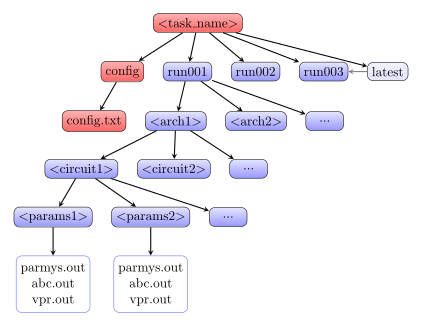
Fig. 13 Task directory layout.
Creating a New Task
Create the folder
$VTR_ROOT/vtr_flow/tasks/<task_name>Create the folder
$VTR_ROOT/vtr_flow/tasks/<task_name>/configCreate and configure the file
$VTR_ROOT/vtr_flow/tasks/<task_name>/config/config.txt
Task Configuration File
The task configuration file contains key/value pairs separated by the = character.
Comment line are indicted using the # symbol.
Example configuration file:
# Path to directory of circuits to use
circuits_dir=benchmarks/verilog

# Path to directory of architectures to use
archs_dir=arch/timing

# Add circuits to list to sweep
circuit_list_add=ch_intrinsics.v
circuit_list_add=diffeq1.v

# Add architectures to list to sweep
arch_list_add=k6_N10_memSize16384_memData64_stratix4_based_timing_sparse.xml

# Parse info and how to parse
parse_file=vpr_standard.txt
Note
run_vtr_task will invoke the script (default run_vtr_flow) for the cartesian product of circuits, architectures and script parameters specified in the config file.
Required Fields
circuit_dir: Directory path of the benchmark circuits.
Absolute path or relative to
$VTR_ROOT/vtr_flow/.arch_dir: Directory path of the architecture XML files.
Absolute path or relative to
$VTR_ROOT/vtr_flow/.circuit_list_add: Name of a benchmark circuit file.
Use multiple lines to add multiple circuits.
arch_list_add: Name of an architecture XML file.
Use multiple lines to add multiple architectures.
parse_file: Parse Configuration file used for parsing and extracting the statistics.
Absolute path or relative to
$VTR_ROOT/vtr_flow/parse/parse_config.
Optional Fields
script_path: Script to run for each architecture/circuit combination.
Absolute path or relative to
$VTR_ROOT/vtr_flow/scripts/or$VTR_ROOT/vtr_flow/tasks/<task_name>/config/)Default: run_vtr_flow
Users can set this option to use their own script instead of the default. The circuit path will be provided as the first argument, and architecture path as the second argument to the user script.
script_params_common: Common parameters to be passed to all script invocations.
This can be used, for example, to run partial VTR flows.
Default: none
script_params: Alias for script_params_common
script_params_list_add: Adds a set of command-line arguments
Multiple script_params_list_add can be provided which are added to the cartesian product of configurations to be evaluated.
sdc_dir: Directory path to benchmark SDC files.
Absolute path or relative to
$VTR_ROOT/vtr_flow/.If provided, each benchmark will look for a similarly named SDC file.
For instance with
circuit_list_add=my_circuit.vorcircuit_list_add=my_circuit.blif, the flow would look for an SDC file namedmy_circuit.sdcwithin the specifiedsdc_dir.includes_dir: Directory path to benchmark _include_ files
Absolute path or relative to
$VTR_ROOT/vtr_flow/.Note: Multiple includes_dir are NOT allowed in a task config file.
include_list_add: A path to an include file, which is relative to includes_dir
Multiple include_list_add can be provided.
include files could act as the top module complementary, like definitions, memory initialization files, macros or sub-modules.
Note: Only include files, written in supported HDLs by each frontend, are synthesized. The others are only copied to the destination folder.
Note: include files will be shared among all benchmark circuits in the task config file.
pass_requirements_file: Pass Requirements file.
Absolute path or relative to
$VTR_ROOT/vtr_flow/parse/pass_requirements/or$VTR_ROOT/vtr_flow/tasks/<task_name>/config/Default: none
testbench_dir: Directory path of the testbench files used for functional simulation.
Absolute path or relative to
$VTR_ROOT/vtr_flow/.Default: same directory as
circuits_dirtestbench_file: Name of the testbench file used to verify the post-implementation netlist.
This file is resolved relative to
testbench_dir. It is passed as the-testbenchargument to theflow_scriptfor every circuit/architecture combination.A per-circuit testbench can also be specified via
circuit_constraint_list_addwith thetestbenchkey, which takes priority over this task-level default.Default: none
flow_script: Script to run in place of the default run_vtr_flow for this task.
Absolute path or relative to
$VTR_ROOT/vtr_flow/scripts/.Use this to substitute a different flow script for all jobs in the task. For example, setting
flow_script=run_func_sim_flow.pyroutes every job through run_func_sim_flow, which runs the VTR flow and then verifies the result with Verilator-based functional simulation.Default: run_vtr_flow
Functional Simulation Tasks
Tasks can be configured to verify the correctness of the post-implementation netlist using run_func_sim_flow. This script runs the full VTR flow and then compiles and executes a Verilator testbench against the resulting netlist.
Example configuration for a functional simulation task:
# Path to directory of circuits to use
circuits_dir=benchmarks/func_sim/adder_4bit

# Path to directory of architectures to use
archs_dir=arch/timing

# Circuit(s) to test — all must implement the same top-level interface
circuit_list_add=adder_4bit.v
circuit_list_add=adder_4bit_sum_notation.v

# Architecture(s) to target
arch_list_add=k6_frac_N10_frac_chain_mem32K_40nm.xml

# Testbench used to verify every circuit listed above
testbench_dir=benchmarks/func_sim/adder_4bit
testbench_file=tb_adder_4bit.sv

# Use the functional simulation flow script
flow_script=run_func_sim_flow.py

# Parse file — captures flow elapsed time; pass/fail comes from exit code
parse_file=func_sim.txt

# QoR parse file — captures flow status and elapsed time
qor_parse_file=qor_func_sim.txt

# Pass requirements — checks that VPR and simulation both succeeded
pass_requirements_file=pass_requirements_func_sim.txt
Note
All circuits listed in a functional simulation task must implement the same top-level port interface, since they share a single testbench. For circuits with different interfaces, create a separate task directory with its own testbench.
See also
run_func_sim_flow for testbench conventions and further details.